Kestrel for Mac
Just you and your story.
Kestrel is made for writers. A calm page that gets out of your way, chapters on a shelf, every word kept, and a manuscript ready to send when you are.


Coming soon to the App Store. Also on iPhone and iPad.
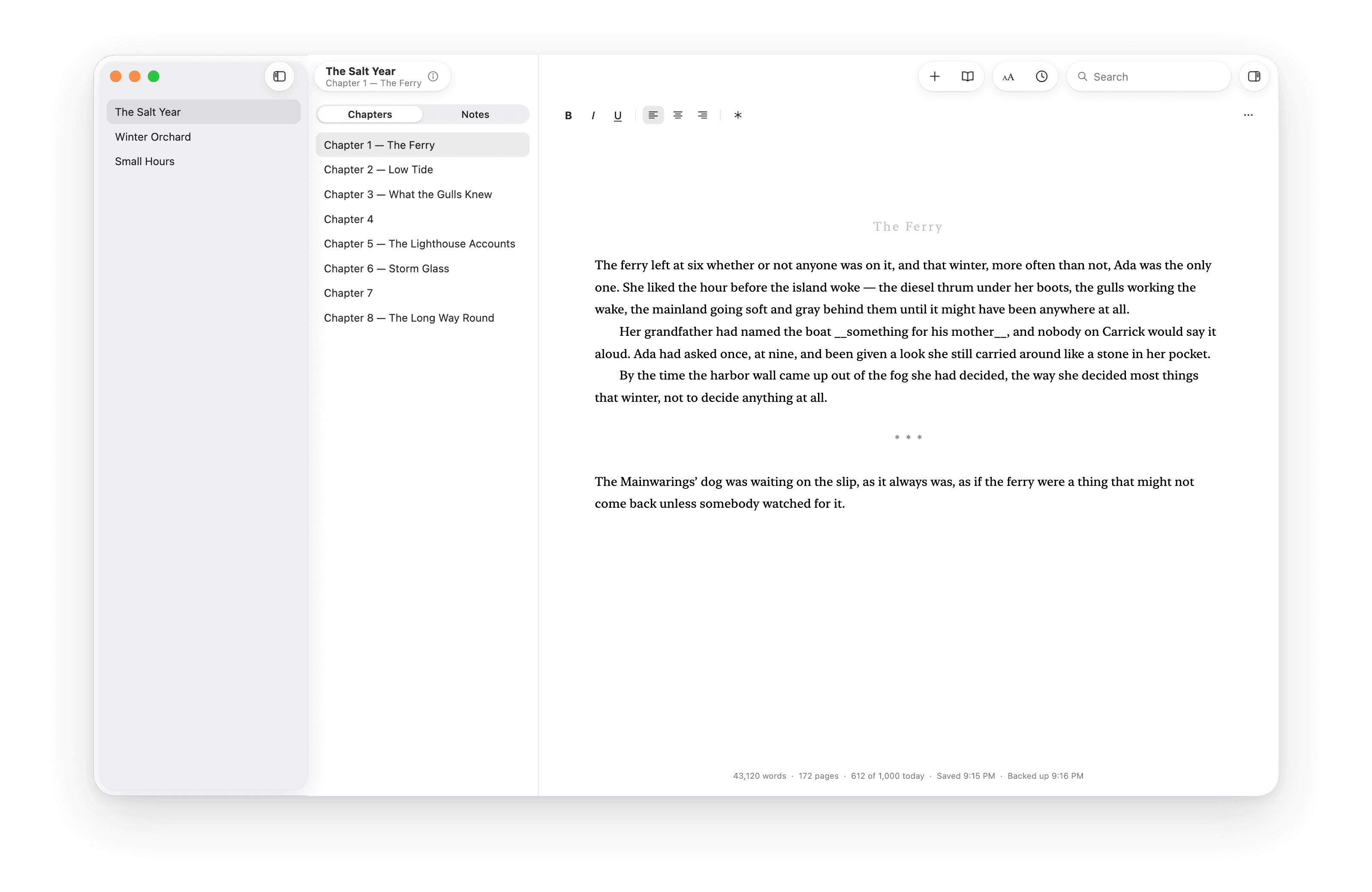
Meet Kestrel.
The page is the hero.
Your words are set in New York at a manuscript’s own size, and zoomed to taste. The toolbar never changes shape while you type, and the word count fades away until you look up. Everything else waits until you ask for it.

Chapters on a shelf. The whole book on one page.
Each book keeps its chapters and notes in order. When you want to read straight through, Whole Book sets every chapter into one long page you can edit, then files each change back into the chapter it belongs to.

Leave a gap. Leave a note.
Not sure of a name yet? Type __something for his mother__ and keep going. Pin a comment to any sentence. The inspector lists every gap and every note in the book so you can work down them one at a time, and comments never leave with the manuscript.

Every word, kept.
Kestrel saves as you write and keeps a history that reads like a writing journal: “Tuesday evening — 842 words on Chapter 7.” Open any moment, read it in the page’s own type, and bring it back.

Backed up and in sync, if you like.
Keep your books in iCloud Drive, a private place on GitHub, or both, and they stay in step across your Mac, iPhone and iPad on their own. Change the same page in two places and nothing’s lost. Or keep it all on this Mac. Your call.

Ready to send.
Export a standard manuscript for Word or PDF, with the title page, running header and scene breaks agents and editors expect, or plain Markdown. Preview every page before anything leaves, and send the whole book or just the first three chapters, fifty pages or ten thousand words.

Bring the book you’ve already written.
Import from Pages, Word, Rich Text, Markdown or plain text. Kestrel finds your chapters, keeps your italics and centred lines, and turns your *** into scene breaks.
Your writing stays yours.
Kestrel keeps your books as ordinary files in a folder you choose, not locked inside the app. Every chapter is its own web page, named and numbered in order, that opens in any browser looking much as it does in Kestrel, comments and all. Your whole history sits in the same folder, in Git, the open format programmers use for their own work, and your backup is a private repository in your own GitHub account that you can download whenever you like. If you ever leave, everything comes with you, and you won’t need Kestrel to read your book.
Kestrel Library/
Kestrel History.bundle
library.json
The Salt Year/
book.json
chapters/
01 The Ferry.html
02 Low Tide.html
03 What the Gulls Knew.html
…
info/
Synopsis.html
Query Letter.html
notes/
Characters.html
Timeline.html
A library kept in iCloud Drive.
Also on iPhone and iPad
The same quiet page, wherever you are.
Write on the train, fix a line in the café, export from the sofa. Keep your books in iCloud Drive and a new iPhone or iPad opens them with nothing to set up, and whatever you write there is waiting on your Mac when you get home.

And all the little things.
Find and replace
In a chapter, the whole book, or every book on your shelf.
Real page counts
Pages counted the way a manuscript prints, not estimated.
A daily goal
Today’s words against your goal, kept quietly to one side.
Your page, your way
Any font on your Mac, any zoom, a column as wide as you like.
Query letters and synopsis
The pitch, the synopsis and every query letter, kept with the book.
Counts for a selection
Select a passage to see its words and its pages.
Keys for everything
Every command is in the menu bar, from the next placeholder to the next comment.
Light, dark and VoiceOver
Built from the system’s own parts, so it’s at home in either, and labelled throughout.
Your book is yours.
Kestrel has no accounts, no servers and no analytics. We never see a word you write. If you turn on backup or sync, your books go only to the iCloud or GitHub account you choose.